
Pie Chart2.52 - Google Play
You'll be able to see results in few seconds.
Publisher Description

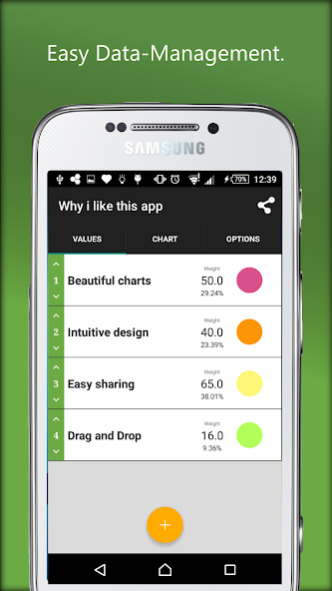

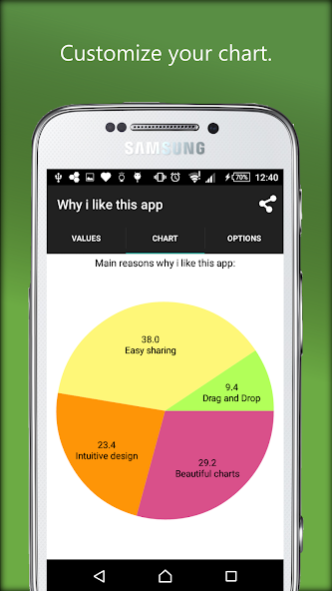
Pie Charts are a great way to communicate information visually. Pie Chart helps you to create, design and share own pie charts within minutes. Perfectly suitable for business and professional pie charts. With its intuitive design and controls Pie Chart is perfectly suited for mobile pie chart creation.
Features:
- Individual color settings for each slice
- Saving your charts for later use and modifications
- Individual annotation settings
- Fast data import via CSV-files
- Import and Export charts via CHART- or CSV-files
- Manage values with Drag and Drop-Features
- See your changes immediately - dynamic and permanent chart redrawing
- Copy existing charts for different versions and small adjustments
- Share your charts directly via Messaging-Apps or E-Mail
Pie Chart is completely free of advertisements, has all features enabled and only a limitation regarding values per chart. To remove this limitation, the proversion can be purchased within the app.
Just give it a try. If you miss any features, don’t hesitate to contact us. We are willing to help our customers and add more features.
About Pie Chart
The company that develops Pie Chart is Selfmade Mobile Solutions. The latest version released by its developer is 2.52.
To install Pie Chart on your Android device, just click the green Continue To App button above to start the installation process. The app is listed on our website since 2016-12-20 and was downloaded 0 times. We have already checked if the download link is safe, however for your own protection we recommend that you scan the downloaded app with your antivirus. Your antivirus may detect the Pie Chart as malware as malware if the download link to maker.piechart is broken.
How to install Pie Chart on your Android device:
- Click on the Continue To App button on our website. This will redirect you to Google Play.
- Once the Pie Chart is shown in the Google Play listing of your Android device, you can start its download and installation. Tap on the Install button located below the search bar and to the right of the app icon.
- A pop-up window with the permissions required by Pie Chart will be shown. Click on Accept to continue the process.
- Pie Chart will be downloaded onto your device, displaying a progress. Once the download completes, the installation will start and you'll get a notification after the installation is finished.
Program Details
System requirements
Download information
Pricing
Version History
version 2.52
posted on 2016-12-20
Version 2.52
- Different bugfixes concerning export/screenshot-mode
- Switched to standard android share-dialog
- Added new language: Spanish
- Added new language: Russian
- Added new language: Japanese
- Fixed Export Bug
Version 2.35
- Added Import/Export
- Complete Rework
- Drag n Drop Features
- Material Design
- More Chart-Settings
version 2.35
posted on 2016-09-06
Version 2.35,- Added Import/Export,- Complete Rework,- Drag n Drop Features,- Material Design,- More Chart-Settings
Disclaimer
Official Google Play Link
We do not host Pie Chart on our servers. We did not scan it for viruses, adware, spyware or other type of malware. This app is hosted by Google and passed their terms and conditions to be listed there. We recommend caution when installing it.
The Google Play link for Pie Chart is provided to you by apps112.com without any warranties, representations or guarantees of any kind, so access it at your own risk.
If you have questions regarding this particular app contact the publisher directly. For questions about the functionalities of apps112.com contact us.
